

Calculation groups can significantly reduce the number of redundant measures by grouping common measure expressions as calculation items.
1. Create a Calculation Group in Power BI
Use case:
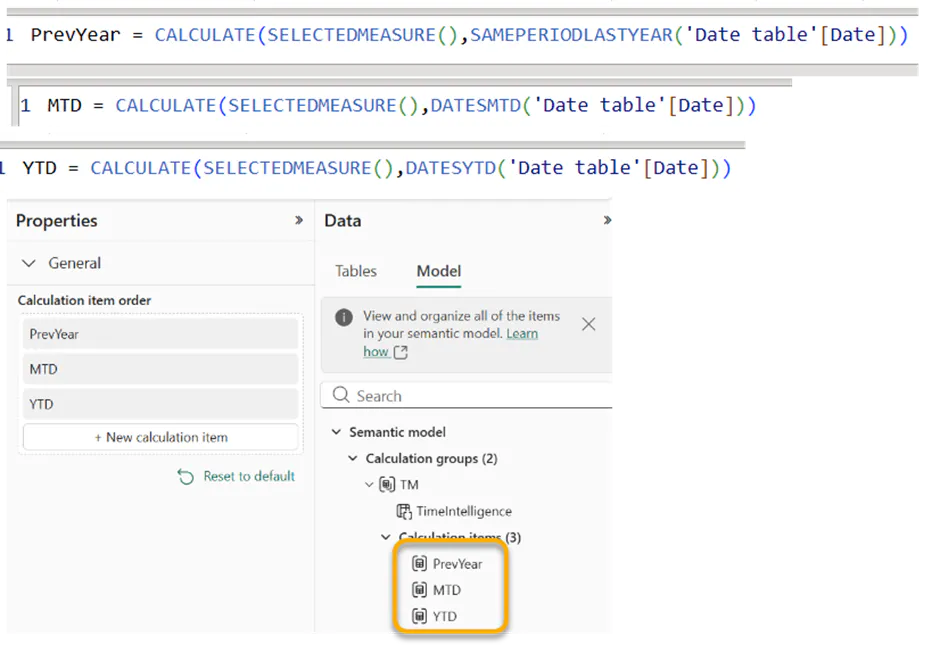
We have TotalSales and TotalQty in the model and need to build time intelligence calculations for Previous Year (PrevYear), Month-to-Date (MTD), and Year-to-Date (YTD).
Using the traditional approach, you would typically create three separate DAX measures for each metric (TotalSales and TotalQty), resulting in multiple individual measures.
Instead, we can simplify the model by creating a single Calculation Group that handles PrevYear, MTD, and YTD calculations for all relevant measures, as illustrated below.
2. Now this Calculation group can be integrated into Superfilter
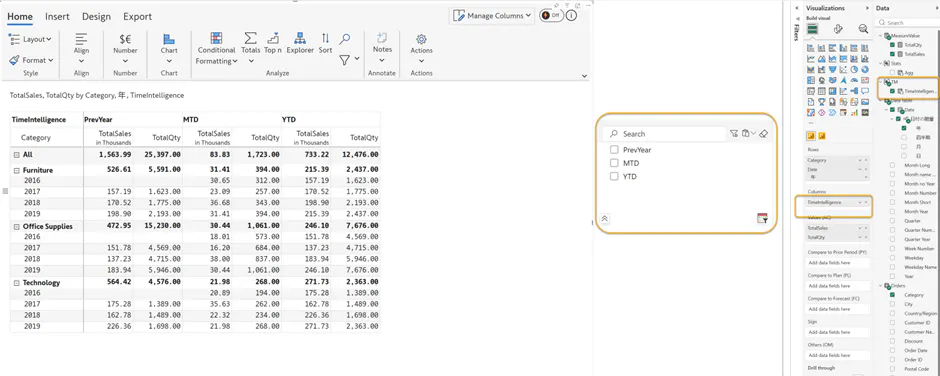
For more information about SuperFilter, refer Introduction to Inforiver Super Filter | Super Filter | Inforiver
and for Calculation Group , refer Calculation groups in Analysis Services tabular models | Microsoft Learn

