Any Power BI report for which you have View or Edit access includes a Reset to default option on the top toolbar.
When you first open the report, the Reset to default button is disabled. This indicates that you are viewing the report exactly as it was published by the report author, with no personal changes applied.

As soon as you interact with the report—for example, by applying a filter, selecting a slicer, or making other report-level changes—the Reset to default button becomes enabled and the reset icon turns colour. This indicates that the report is no longer in its default state.
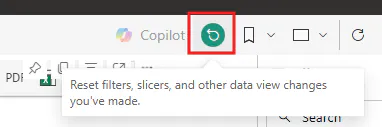
Clicking Reset to default removes all the changes you have made during the session and restores the report to the author's published view. The report visuals, filters, and formatting will revert to their original state, similar to the behavior you experience when resetting a report in Power BI Desktop.
Should you have questions, feel free to post it in the comments section.